Restoration job management software: Every water loss on one board, with the readings adjusters ask for
Loss intake, on-call dispatch, drying logs with readings, equipment by room, and a page for the homeowner in English or Spanish.
Where it standsBuiltIntake, dispatch, the tech app, the homeowner’s page and drying reports.
Readings. On site, Alex logs the first moisture readings, which set each point’s starting value. The homeowner sees the rooms and machines.
A homeowner calls at 5:41 AM about a burst supply line. The office sends the closest two-person crew. The technician taps On my way and the homeowner watches the truck come on their page. On site he logs the first moisture readings, and the homeowner sees the rooms drying and the next visit.
See a sample day forfield and home servicescontractorscar dealershipssalons and spas
What’s in the restoration build
We build job management software for water damage restoration companies. It takes the after-hours loss call, dispatches from a live map with an on-call schedule, and puts moisture readings, photos on the room sketch and equipment by room on the crew’s phones. The homeowner gets a page in English or Spanish with who’s coming, how drying is going room by room, and what to do right now. The office gets one drying report for the adjuster, and a room sheet for the estimate. It’s built on what we learned running the back office of a restoration company.
The night call, the readings and the file
What goes wrongThe phone rings after hours, and nobody’s sure who’s on call.
What changesAn on-call schedule for each office, with a backup and a manager. If a new caller already has an open job at that address or number, you’re warned before it’s entered twice, and you dispatch from the live map.
DispatchWhat goes wrongMoisture readings are in one app and the photos are in another.
What changesMoisture readings with a check that flags numbers that look mistyped, and photos pinned to their spot on the room sketch.
Tech appWhat goes wrongNobody’s sure which air movers are where, or when they can come out.
What changesEvery air mover and dehumidifier tracked by room, until it’s pulled at dry goal.
EquipmentWhat goes wrongThe adjuster wants the file, and somebody loses a day building it.
What changesOne drying report with readings, photo pages and room sketches, plus a room sheet with dimensions ready to key into your estimating software.
Reports
The operations board, as built
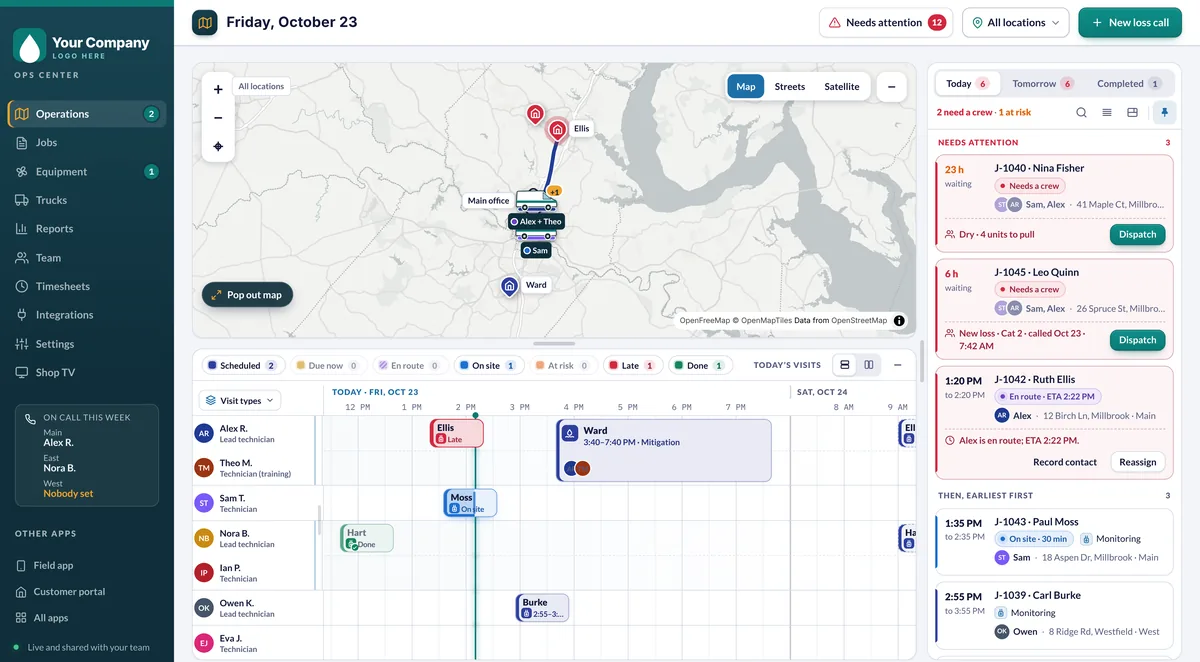
- Needs attention. Losses waiting for a crew, and how long each one has waited.
- Live map. Crews and open losses, so you dispatch from where people are.
- Today’s visits. Each tech’s day on one line, with a line at the time now.
- On call this week. Who takes the 2 a.m. call at each office, and where nobody is set yet.
Questions from restoration offices
Does it work with Xactimate?
Not directly: Xactimate only imports its own files. You get a room sheet for your estimator, with each room’s dimensions, walls and wet areas ready to key in, and a scaled plan image to load under the sketch. The drying report with readings, photo pages and room sketches goes in the file.
Who takes the call at 2 a.m.?
Your on-call schedule decides. Each office has an on-call tech, a backup and a manager. The call goes in once, and if that caller or address already has an open job, you’re warned before it’s entered twice.
What does the homeowner see?
A page with your name and logo that shows who’s coming and when, how drying is going room by room, and what to do right now, in English or Spanish.
How do readings get checked?
The tech app flags readings that look mistyped, and photos are pinned to their spot on the room sketch.
We already use restoration software. Do we have to drop it?
No. We bring over what your current software exports, usually a spreadsheet, and run the new system alongside it until your team is ready. Your plan says what you keep and what connects.
Some of my techs aren’t good with phones. Will they use it?
Usually, yes. We build it around how they already work, with big buttons and short screens, and train them in person on real jobs.
Tell us what’s slow
Tell us what happens when the phone rings after hours.
Got it. Thank you
Carla or Pedro will get back to you, usually within one business day.
Or reach us directly
- Calls and texts
- 540-498-1830Carla
- Pedro@
PrestigeDigitalOps.com Pedro - Where
- The Fredericksburg, Virginia area. We come to you.